
1777PKR Game Download in Pakistan – APK, Login & Guide
Description
1777PKR is an online gaming platform with a website at 1777pkr.com. The website describes itself as a platform for online slot games. Pakistani users looking for 1777PKR may want to understand how to access it, create an account and use its available options.

The platform can be accessed through its website and an Android APK, according to the information provided for this guide. It is important to use the correct website and avoid downloading files from unrelated pages.
This guide explains the basic access and account steps. It also covers payment methods, safety checks and common questions. It does not promise winnings or guaranteed income because game results and payment conditions can vary.
How Does 1777PKR Game Work?
1777PKR presents itself as an online slot gaming platform. Users can visit its website to check the available options and learn how the platform works.
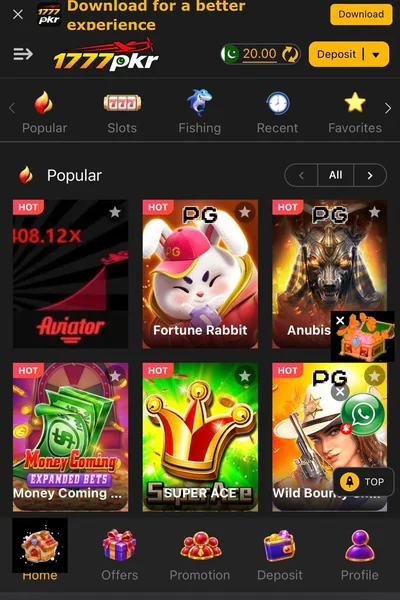
The general process for using an online gaming platform may include:
- Opening the website or Android application.
- Reviewing the available games and their rules.
- Creating an account if registration is required.
- Checking the payment options and account conditions.
- Using the platform only after understanding its terms.
The exact game selection, account requirements and gameplay rules should be checked on the live platform. Do not assume that every game or feature advertised on another website is available on 1777PKR.
Main Features of 1777PKR
The available website information identifies 1777PKR as an online slot gaming platform. Here are the main points users should understand before accessing it.
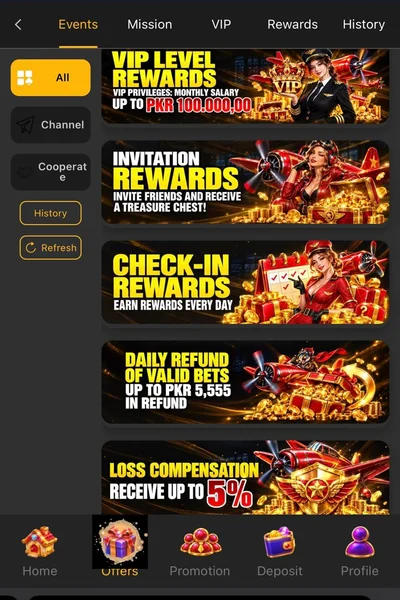
Online Slot Games
The website describes its service as an online slot gaming platform. Users should check the game lobby and read each game’s rules before taking part.
Website Access
Users can visit 1777pkr.com through a web browser. This can be useful when they want to check the platform without first installing an Android application.
Android APK Option
An Android APK option has been confirmed for this guide. Before downloading, check that the file is provided through the correct platform and that the download page matches the website.
Local Payment Methods
JazzCash and Easypaisa have been confirmed as supported payment methods for this guide. Users should check the payment section for current limits, charges and processing conditions before making a transaction.
Account Login
Registered users can use the login option to access their accounts. Keep your password private and avoid sharing account details with other people.
What to Check Before Downloading 1777PKR APK
Downloading an APK requires more care than installing an app from a trusted app store. A file can have a similar name to the platform but come from an unrelated source.
Before downloading, check these points:
- Open the correct website: 1777pkr.com.
- Look for the Android download option on the website.
- Check the file name and download source.
- Review the listed app version and file size, if provided.
- Check the Android requirements before installing.
- Avoid APK files shared through unknown social media accounts.
- Stop if your phone displays a serious security warning.
If the website does not provide a working download, do not replace it with a file from an unknown source.
How to Download 1777PKR APK on Android
If you want to use the Android version, follow these general steps. The exact buttons and screens may differ depending on the current download page.
- Open the 1777PKR website at apkonly.com.pk
- Look for the Android APK or download option.
- Check the file name and download source before continuing.
- Tap the download option if the APK is available.
- Wait for the file to finish downloading.
- Open the downloaded file from your phone’s Downloads folder.
- Review the Android installation warning and requested permissions.
- Continue only if you trust the source and understand the permissions.
Do not install an APK from an unknown message, advertisement or unrelated website.
How to Install 1777PKR on Android
After downloading the APK, you may need to allow installation from your browser or file manager.
- Open your phone’s Settings.
- Find the option for installing unknown apps. Its location can vary by Android version.
- Select the browser or file manager used to open the APK.
- Allow installation only if you have checked the file source.
- Return to the downloaded APK and open it.
- Follow the installation instructions shown on your phone.
- Open the app after installation is complete.
Android may display a security warning for apps installed outside Google Play. Do not ignore warnings automatically. Stop if your phone reports a serious security problem or the app asks for permissions that do not make sense for its purpose.
How to Register on 1777PKR
You need an account if the platform requires login before accessing its account features.
Follow these general registration steps:
- Visit the 1777PKR website or open the installed app.
- Look for the Register or Sign Up option.
- Read the registration instructions.
- Enter only the details requested by the platform.
- Create a strong and unique password.
- Complete any verification step shown on the screen.
- Review the terms and conditions before submitting the form.
The exact registration fields have not been independently verified. Do not assume that the platform requires only a phone number or that registration is completed without verification.
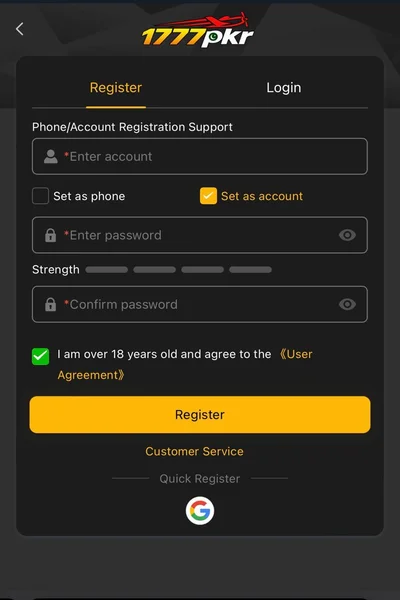
Never share your password or verification code with someone claiming to be a support agent.
How to Log In to 1777PKR
If you already have an account, use the login page to access it.
- Open the 1777PKR website or app.
- Tap the Login option.
- Enter your registered account details.
- Type your password carefully.
- Complete any security check if requested.
- Submit the form to access your account.
If login fails, check your internet connection and account details. Use the password recovery option if one is available. Avoid creating several accounts to solve a login problem unless the platform’s rules allow it.
JazzCash and Easypaisa Payment Methods
JazzCash and Easypaisa are the local payment methods confirmed for this guide. Pakistani users should still check the payment page before making a transaction.
| Payment Method | What Users Should Check | Safety Tip |
|---|---|---|
| JazzCash | Current availability, transaction limits and charges | Confirm the receiver details before sending money |
| Easypaisa | Current availability, transaction limits and charges | Keep the transaction receipt |
Before Making a Deposit
Check the following details before sending money:
- Confirm that the payment option is available in your account.
- Read the minimum and maximum transaction limits.
- Check any service charges or other conditions.
- Confirm the account number and payment details carefully.
- Keep the transaction receipt until the payment is resolved.
- Never send money to a personal number shared through an unrelated message.
What About Withdrawals?
Payment support does not automatically prove that withdrawals are guaranteed. Before depositing money, read the withdrawal rules and check the stated eligibility conditions.
Look for information about minimum withdrawal amounts, possible fees, verification requirements and processing times. If these details are unclear, contact the platform through a support channel listed on its website.
Do not rely on promotional claims about instant payments unless you can verify the actual terms.
Is 1777PKR Safe to Use?
A website or APK cannot be considered safe simply because it opens or installs successfully. Users should check the source, permissions, privacy terms and payment conditions before using any online gaming platform.
Consider these precautions:
- Use the correct website address: 1777pkr.com.
- Avoid APK files from unknown websites.
- Review Android security warnings before installing.
- Check the permissions requested by the app.
- Do not share passwords, OTPs or wallet PINs.
- Read the privacy policy and terms before registering.
- Do not deposit money you cannot afford to lose.
The available website information is not enough to independently confirm the platform’s security standards, licensing, fairness testing or withdrawal reliability. Users should verify these matters rather than relying on promotional statements.
Important Points for Pakistani Users
Online slot games involve financial risk. A game result is not a reliable way to earn regular income.
Keep these points in mind:
- Set a spending limit before playing.
- Never use borrowed money for gaming.
- Do not try to recover losses by depositing more.
- Take breaks and stop when gaming affects your daily routine.
- Keep gaming separate from household and essential expenses.
- Follow the laws and rules that apply in your location.
If you cannot afford to lose the money, do not deposit it.
Common 1777PKR Problems and Possible Solutions
Website Is Not Opening
Check your internet connection and make sure the address is typed correctly. You can also try opening the website in another browser.
APK Is Not Downloading
Check your phone’s available storage and internet connection. If the download button does not work, avoid searching for random APK copies.
App Is Not Installing
Make sure the file has downloaded completely. Check whether your Android version supports the app, but do not assume compatibility if the requirements are not listed.
Login Is Not Working
Check your username or registered details and password. If the problem continues, use the official account recovery or support option if available.
Payment Is Not Showing
Keep your transaction receipt and check your wallet history. Do not repeat the payment immediately. Contact the relevant payment service or platform support with the transaction details.
Advantages and Limitations of 1777PKR
Points to Consider
- The platform has a dedicated website.
- Website and Android APK access have been reported for this guide.
- JazzCash and Easypaisa support has been confirmed for this guide.
- Users can check the website before deciding whether to install the APK.
Details That Need Checking
- Current APK version and file size are not independently verified.
- Android compatibility details are not confirmed.
- Specific game titles and features need to be checked in the live game lobby.
- Withdrawal limits and processing times need confirmation.
- Security, licensing and independent fairness checks have not been established.
Frequently Asked Questions
What is 1777PKR Game?
1777PKR is an online gaming platform. Its website describes it as a platform for online slot games.
Can I access 1777PKR on Android?
Android APK access has been confirmed for this guide. Check the website for the current download option and device requirements before installing.
Does 1777PKR support JazzCash and Easypaisa?
Both JazzCash and Easypaisa have been confirmed as supported payment methods for this guide. Check the platform’s payment page for current transaction rules.
How can I register on 1777PKR?
Open the website or app and look for the Register option. Follow the instructions shown on the screen and review the terms before submitting your details.
Is 1777PKR a guaranteed earning app?
No gaming platform should be treated as a guaranteed source of income. Slot games involve risk, and users may lose money. Do not use borrowed money or depend on gaming for essential expenses.
Final Thoughts
1777PKR is presented on its website as an online slot gaming platform. Pakistani users can check its website and the reported Android APK option before deciding whether to access it.
JazzCash and Easypaisa support has been confirmed for this guide, but users should still review current payment and withdrawal conditions. Check the download source, app permissions and platform terms before registering or making any payment.
Online slot games involve financial risk. Play responsibly, follow applicable local laws and never spend money needed for daily expenses.
Download links
How to install 1777PKR Game Download in Pakistan – APK, Login & Guide APK?
1. Tap the downloaded 1777PKR Game Download in Pakistan – APK, Login & Guide APK file.
2. Touch install.
3. Follow the steps on the screen.